The AI video editor built for long-form.
Ten raw minutes in. Your timeline out.
Brief it like a crew — researcher, scriptwriter, asset wrangler, motion designer. It transcribes every word, holds the thread from minute one to minute ten, and builds the whole composition on your machine. What comes back is a real timeline, not a locked MP4 — proven below on a real 10-minute edit.
No credit card to start. No render credits, ever. Your raw footage is never uploaded to us.
renders on your machine — never metered
motion presets it can cast, every one editable
rebuilds when the message changes
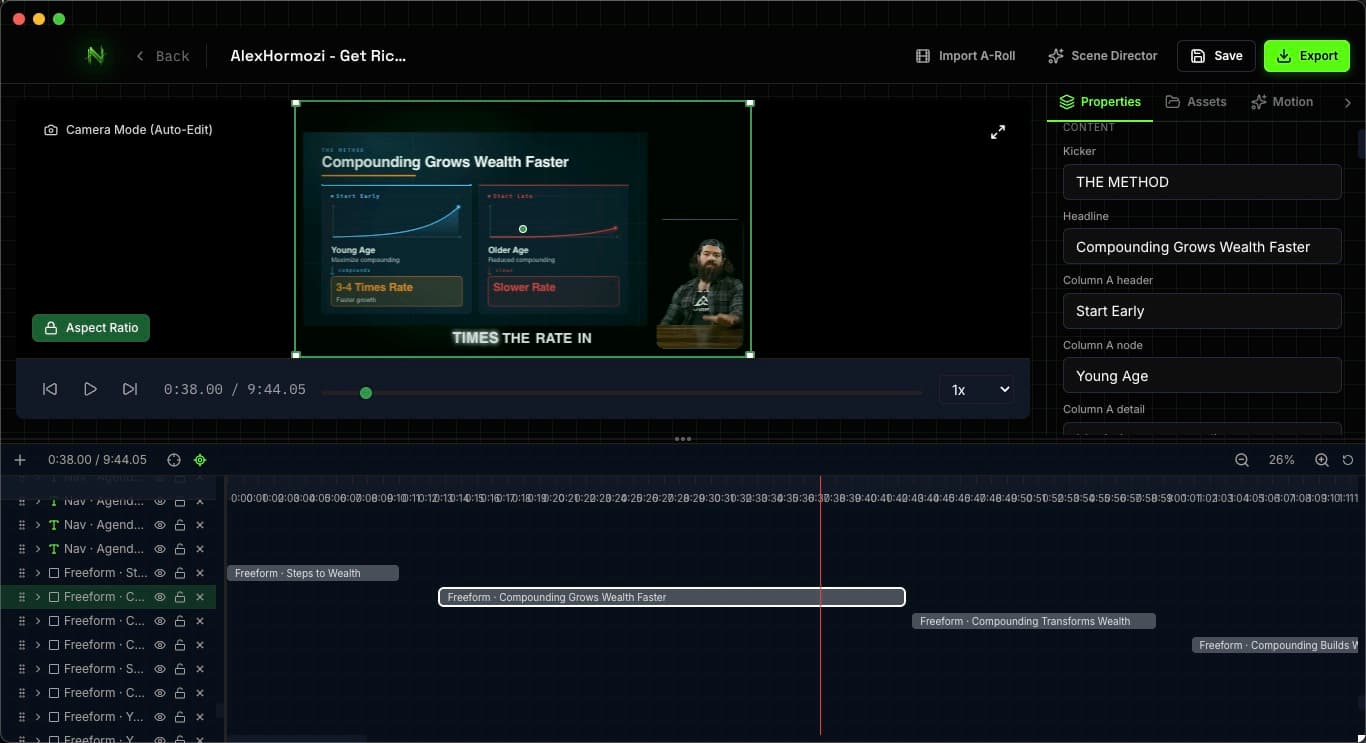


AI video tools don't save you time. They just move the waiting.
You prompt. You wait. The result is 90% right — and 100% locked.
The title is one word off. The chart animates too early. Your brand color is wrong.
So you re-prompt. And wait again. And again.
That's not editing. That's gambling with render credits.
And the money isn't even the worst of it. The best cut of that video was version nine — you shipped version three, because four through eight had a price.
What if the AI did the first 90% — and gave you a real timeline for the last 10%?
With your face. Or without one.
Same crew, two starting points. Hand it your raw recording — or hand it nothing but an idea. Either way, what comes back is a timeline.
Talking head
You on camera, the crew around you.
Drop your raw recording. NeoMotion transcribes every word, then builds the edit around what you actually said — kinetic captions, b-roll cut-outs, animated charts, all anchored to your voice.
- Starts from: your raw footage
- Captions and cues locked to your spoken words
- Your face carries the video — the crew carries everything else
For creators building a personal brand.
Faceless video
No camera. No mic. No credit meter.
Type an idea — or paste a script you already have. The crew researches, writes (or keeps your script word for word), voices it, gathers the visuals, and builds the full composition. You never appear on screen.
- Starts from: one line, or a finished script
- Local AI voiceover (no API key), stock and generated visuals
- Renders locally — unlimited exports, nothing metered
For explainer, documentary, and niche channels that scale past one face.
Most faceless-video tools are web apps that meter every render in credits. NeoMotion runs on your machine — version nine costs the same as version one: nothing.
Most AI video tools can only use what they can generate.
Any model can write a script. Almost none can go get the b-roll, cut the subject out of it, and put it on a timeline. That gap is the product.
It finds and preps the b-roll for you
Searches your own assets first, then stock and the open web; generates what's missing, cuts subjects out of their backgrounds, colour-matches, and drops it on the timeline. The unglamorous 70% of production that every other tool skips.
Bring your own AI — zero markup
Point Claude, Cursor, or any MCP client at NeoMotion and it operates the app directly — creates the project, imports media, composes scenes, exports. Your subscription, at provider cost, zero markup.
Everything it makes stays editable
Every output is a live composition — text, color, timing, layers. Click any element, change it, and export again. Your fiftieth export costs exactly what the first one did: nothing.
You approve the plan before it spends
You see the edit plan before a single asset is fetched. Approve it, rewrite it, or kill it. Autonomous where the work is boring, supervised where the work is yours.
Captions pinned to your spoken words
Captions, emphasis, and cues lock to the actual words you spoke — transcribed word-by-word, on your own machine. The AI can't drift, because it's pinned to your voice.
Your footage stays yours
NeoMotion is a desktop app. Multi-gigabyte raw footage renders locally and never touches our servers. Your unreleased content stays unreleased.
Voiceover with no API key
Studio AI voiceover generated on your own machine — no key to configure, no per-character bill. Nine built-in voices, plus voice cloning that learns yours from a single reference recording, GPU-accelerated.
Sound design on autopilot
SFX land on every reveal and the music bed auto-ducks under your voice — each one a real timeline row you can drag, swap, mute, or fade. A curated royalty-free library ships in the box.
It learns a look from any video
Point it at a reference video and it decodes the style — palette, typography, signature moves — into a reusable pack. Your next video ships in that look, and every scene stays editable.


This isn't a loading bar. It's the crew working.
Every other tool shows you a spinner and hands you an MP4. NeoMotion shows you the job — step by step, with a stop button on every one.
Generate with AI
Generating your video composition…
Searching 2 queries in parallel
- 1Processing input…
- 2Researching topic…
- 3Writing script…
- 4Creating storyboard…
- 5Acquiring assets…
- 6Building composition…
- 01
Processing input
Your recording, a script, or a one-line topic. Transcribed word-by-word, chapters mapped.
- 02
Researching topic
Parallel searches for facts, figures, and references — so the script isn't invented on the spot.
- 03
Writing script
A structured narration with beats, not a wall of text. Yours to rewrite before anything renders.
- 04
Creating storyboard
Scene by scene: what's on screen, which motion preset carries it, how long it holds.
- 05
Acquiring assets
Stock search, image generation, background removal, colour matching. Real material, prepared.
- 06
Building composition
Layers, keyframes, captions, charts — assembled into a timeline you can pick apart.
Stop at any step. Edit anything after. Nothing is baked until you export.
Drive it with your own agent →Drop a recording. Approve the plan. Ship the edit.
You stay the director. The AI does the first 90%, then hands you a real timeline for the last 10%.
Drop in anything
A raw talking-head recording, a topic, a script, or just audio. NeoMotion transcribes word-by-word and maps your chapters automatically.
Review the AI's edit plan
The AI proposes where captions pop, charts animate, and b-roll cuts in — anchored to your actual words. You approve before a single asset is fetched. You're the director; it's the crew.
Refine on a real timeline
Get back a full composition: kinetic captions, stock b-roll, animated charts, color grade. Tweak any layer, retime any keyframe, export MP4 / WebM / ProRes up to 4K.
200+ presets that know when to appear, not just how to look.
Kinetic captions, headline cards, lower thirds, animated charts, stat count-ups, 2.5D parallax scenes, camera moves. Every preset carries semantic metadata — so the AI picks the right motion for the right sentence, deterministically. Same input, same edit, every time. Built something you like? Save your own layers as a preset — the AI can cast those too.
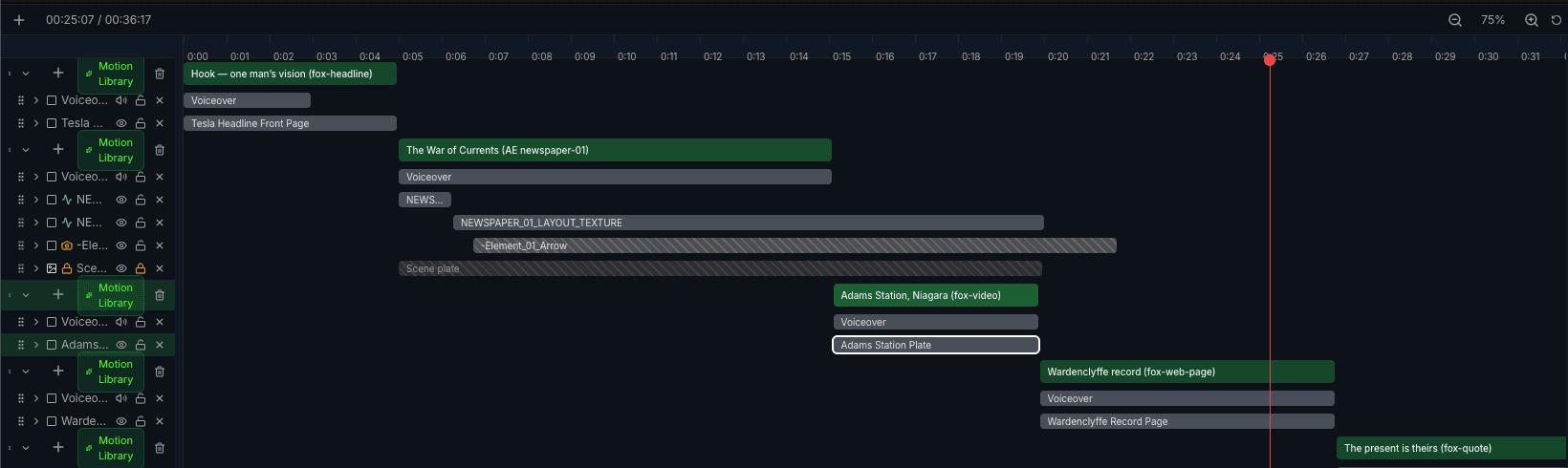
An actual timeline from the app — every block is a cast preset, named for the sentence it carries.
Ten raw minutes in. A finished long-form edit out.
Short clips are easy — every AI tool demos one. So we handed an agent a real 10-minute talking-head video and one brief. It transcribed every word, mapped the chapters, built charts from the numbers the speaker actually said, and returned an editable project — not an MP4. Here's the same minute of it, before and after.
What we gave it
What came back
The same 68 seconds of a 10-minute video, edited end-to-end by a stock Claude agent driving NeoMotion over MCP — on the Claude subscription we already pay for, with transcription running on-device via local Whisper. No API key configured, no credit spent. Source footage: Alex Hormozi — an unaffiliated editing demonstration; every overlay was generated from the words in the recording.
And what came back isn't a video file. It's this project.
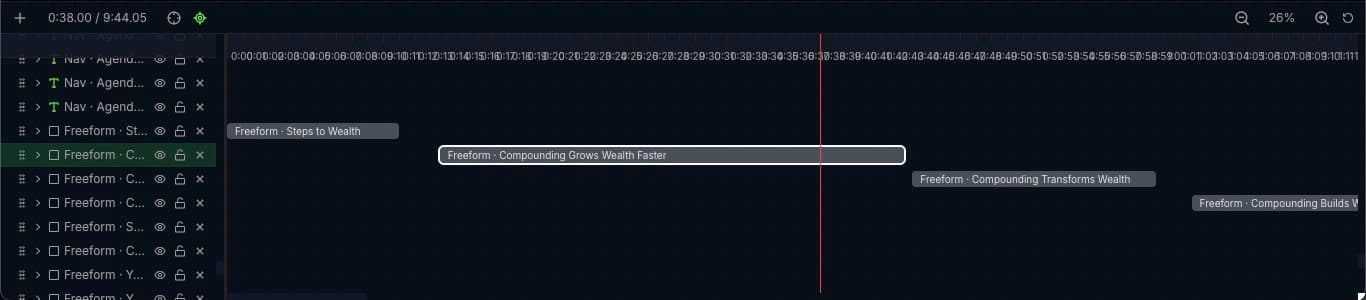
The project's timeline: 9:44 of footage, block by block — every one a named scene the agent wrote. Open any block and its headline, chart labels, and numbers are just fields. If one scene misses, you fix that scene. You don't regenerate ten minutes.
No footage at all. One brief still becomes a video.
The 10-minute edit above started from your kind of footage. This one started from nothing: a 36-second faceless explainer built from a single brief — no camera, no footage of ours; research, script, assets, composition. Nothing was touched by hand before export.
Exported straight from NeoMotion. The editor screenshot at the top of this page? Same project, mid-edit.
Try every Studio feature free for 14 days.
No card to start. Install NeoMotion, sign in, and the full Studio unlocks — watermark-free export, up to 4K, and your own AI agent driving the app. Founding prices stay locked for as long as you keep your plan.
Credits don't cost you money. They cost you versions.
Every plan renders on your machine, unmetered. Your fiftieth export costs exactly what the first one did — there's no server in the loop, so there's nothing for us to bill.
Studio
Cancel any time, keep your projects.
The whole app on your own AI keys — no markup, no credits to top up. Switch to yearly whenever you're sure.
What's included
- Watermark-free export, up to 4K
- Unlimited local renders — no meter, no credits
- Full motion library (200+ presets)
- Agent control surface (MCP) — bring your own Claude, Cursor, or OpenAI
- Word-accurate transcription — English on-device
- Local AI voiceover & voice cloning — no API key
- 2 devices
Studio
Save 57% versus paying monthly.
The same Studio, paid once a year — $97 against $228 if you pay by the month. This is the plan most people land on after the trial.
Everything in monthly, plus
- $131 a year cheaper than monthly — over half off
- Every new preset family as it ships
- Founding price locked while you stay subscribed
Studio Lifetime
Founding price — one payment, updates forever, 3 devices.
Pay once, own the app. Offered while we're building — it goes away once the founding cohort closes.
Everything in yearly, plus
- One payment, no renewal
- Lifetime updates — not 12 months, forever
- 3 devices instead of 2
- Founding-cohort pricing, never repeated
- Unlimited renders — no credit balance to expire, ever
Start free — no card required
Download NeoMotion and sign in: you get 14 days of full Studio. When the trial ends the app keeps working on the free tier — 1080p export with a watermark — and your projects stay local files you own either way.
Cancel anytime. Projects are local files — they're yours even if you leave.
Frequently Asked Questions
Straight answers on how NeoMotion is different, what it needs, and what stays on your machine.
They generate pixels — a finished, flattened video. NeoMotion generates a composition: layers, keyframes, and controls you can keep editing forever. If the message changes tomorrow, you edit for 30 seconds instead of regenerating and praying.
The model writes. NeoMotion does. Searching stock, generating and cutting out images, colour-matching, casting the right preset to the right sentence, keyframing a timeline, and exporting are app operations — not text generation. Swap the model out and that pipeline still works. That's the part we built.
Yes. NeoMotion runs a local MCP server on your machine, so Claude Code, Claude Desktop, Cursor, or anything that speaks MCP can operate the app directly — create a project, import media, compose scenes, author a custom motion graphic, render. You pay your provider; we take no cut.
Not to start. Voiceover and English transcription run locally on your machine — no key, no bill. For script-writing, image generation, and non-English transcription you either paste your own keys (OpenAI, Gemini, Replicate) or connect the AI subscription you already pay for over MCP. Either way, we never mark up inference.
Yes — that's half the point. Start from a one-line idea, or paste a finished script and the crew keeps it word for word. It researches, writes, voices, gathers visuals, and builds the composition without you filming anything. And because rendering happens on your machine, there's no credit meter — the economics that break most faceless workflows don't apply.
It can't. Every caption and cue is anchored to your transcribed words — down to the word. The AI proposes; you approve; nothing renders without you.
No. NeoMotion runs on your machine (Apple Silicon Macs on macOS 12+, or Windows 10/11). Editing, rendering, and English transcription happen locally — multi-gigabyte footage never gets uploaded, because there's nowhere for us to upload it to. AI features send only the little they need — a search phrase, a thumbnail — to the providers you choose, never to us.
Any laptop from the last few years. The floor is 4 CPU cores, 8 GB of RAM and about 15 GB of free SSD space. The sweet spot is 8 cores and 16 GB — that's where exports feel quick and you never have to touch a setting. On Mac you need Apple Silicon (M1 or newer) on macOS 12 or later; on Windows, 10 or 11, 64-bit. There's no Intel Mac or Linux build.
No — and that's on purpose. NeoMotion renders frames on the CPU so the same project produces identical frames on every machine, which is exactly what lets us verify a scene before you ever see it. No CUDA, no minimum VRAM, no graphics card shopping. Your GPU still helps where it's free: hardware video encoding on the final file, and 3D, map and shader layers while you're editing. If you want faster exports, more CPU cores is the lever — nothing else comes close.
Around 800 MB to download and about 2 GB installed, because NeoMotion ships its own renderer, ffmpeg and browser rather than making you install them. The optional local voices and transcription models add up to 2.9 GB more, and only if you switch them on. Your footage costs nothing extra: video and audio are edited where they already sit, never copied into a library. Plan for 15 GB free, or 50 GB if you cut long recordings.
It's your computer. Your CPU, your electricity, our software. There's no server in the loop, so there's nothing for us to bill and no meter we could run even if we wanted to. The real trade is time: a long 4K export ties up your machine instead of a render farm. Worth it, around version nine.
Founding members keep beta pricing for life. Everyone who joins after launch pays the standard rate. That's the trade: you help us polish it, you keep the founding price.
The next video you make will either be a file you own — or another MP4 you can't touch.
Early access is open now. Founding pricing ends when beta does.
No account yet? Get early access — free
macOS 12+ & Windows 10/11 · No credit card, no render credits · 2-minute setup
Bring the agent you already pay for